
Dialogue System
What I did : I tested several graphics systems on Unity to select the most flexible one.
1. I first spent a few days browsing through a Git repository .
The graph was complete, but integration at runtime was too time-consuming, as was navigating through the numerous scripts.
2. I then followed a Youtube tutorial that used Unity's Graph Toolkit.
I abandoned the Graph Toolkit because of its lack of modularity (drop-down lists without enums, nodes, graph view editing, etc.).
3. The final project is based on an experimental package from a friend who had created his own graph view from scratch.
The graph was well advanced but, above all, particularly flexible, so I had no limits!
What I liked : working with code from different people, several times, and exploring different ways of achieving the same result in order to select the best one with good reason.
What I did : Stable and functional dialogue system : Graph View (choice nodes, conditional choices, new IF node, debug information, speakers, moods/sprites/audio), Dialogue Manager
How I did it : I followed the YouTube tutorial to create the choice nodes, which helped me understand the tool. For the IF node I added, I had to change the project architecture by making my branch inherit from a new parent RuntimeNode class to separate general nodes from those specific to the dialogue. All data related to speakers is in a ScriptableObject.
What I liked : Add my own features by exploring a new Unity toolkit and understanding its limitations.


Choice Node
- What I did : I have edited node saving in graph view and the condition system for dialogue nodes and Branch nodes. I have also added an events section.
- What I liked : Understand and debug existing code and add my own features to it, following pre-existing coding conventions.

Dialogue Node
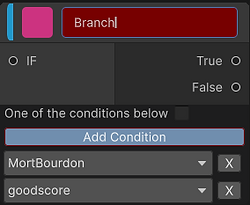
Branch Node
Conditions
Goal : Easily reference any condition with any Boolean of the project (GD, GP).
How I Did : Database, filled by the GDs, which lists all the conditions of the game and/or scene. This data is retrieved by the Conditions Manager of the scene, which lists all conditions. Each condition has a Check section where we can drag n'drop any object and then can only select a method that returns a boolean. I retrieved this feature from the Git Repository tested earlier. The condition keys are thus added to the drop-down lists of the branch and choice node nodes.
What I Liked : I took the best of the previously tested system and integrated it into my own system to create a really friendly editor for both GD and GP.


Events
Goal : Create a modular system designed to facilitate the integration of all types of events by GD, GP or GA.
How I Did : I used Unity Events for their modularity. They are useful for launching and accumulating simple actions (activating/deactivating objects, launching animations, particles, sounds, etc.) or more complex ones. Each event, listed in the database, has its own key and information on whether the event is in ‘prefab’ or not, so that events that are the same between scenes do not have to be integrated multiple times.
For ‘non-prefab’ events, they are displayed in the scene's EventsManager. Thus, the event is different depending on the scene and can use runtime objects.

UI Animations
What I did : I did the UI using Canvas, Buttons, Pannel, UI particle systems, fonts (encoding, import, font asset settings), layout groups ... and I made animations for speakers, interface animations (containers, buttons), and other occasionnal animations (flash, ...)
How I did it : I made Clip Animations and played with different parameters (opacity, pivot, scale ...), and tried animation events. In the Animator, I used bools and triggers, added states (empty state, clips, reverse clips), played with exit time, transition, conditions ...
What I liked : Add juiciness that is immediately visible to the player.

Speaker Animator

Player Animator